How to Use Google’s “Results About You” to Track and Protect Your Personal Data

Learn how to use Google’s Results About You to automatically monitor, get alerts, and request removal of personal information found in search results, keeping you can stay in control of your online privacy.
In today’s connected world, your personal information—such as your home address, phone number, or email—can easily end up on public websites without your consent. Once indexed by Google Search, this data may expose you to doxxing, identity theft, spam, or harassment.
Fortunately, Google has introduced a powerful tool called Results About You, allowing you to track when your personal data appears in search results and request its removal.
- What Is Google’s “Results About You”?
- Why This Feature Matters
- How to Use “Results About You” to Monitor Your Privacy
- Pro Tips for Maintaining Online Privacy
- Bonus: SafeSearch Now Blurs Explicit Images by Default
- Frequently Asked Questions (FAQ)
- Conclusion
What Is Google’s “Results About You”?
Google’s Results About You is a privacy-focused feature within your Google Account. Once you set it up, it continuously scans Google’s indexed pages for matches of your Personally Identifiable Information (PII), such as:
- Full name
- Home address
- Phone number
- Email address
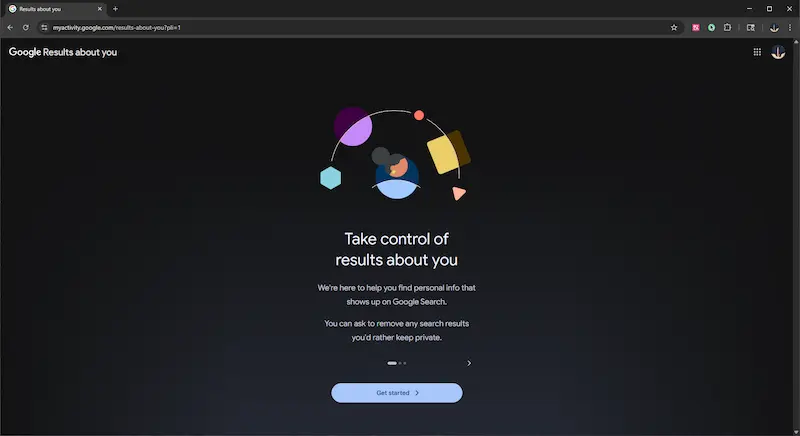
When the tool detects these details in a search result, you’ll receive an alert and can decide whether to request removal.
Why This Feature Matters
The main goal of Results About You is to protect users from online threats, such as:
- Doxxing – Publishing private information online without consent
- Identity theft – Using stolen personal details for fraud
- Harassment or stalking – Online or offline safety risks
Instead of having to manually search for and report privacy violations, you can now rely on Google’s automated monitoring system and dashboard to help you stay in control.
How to Use “Results About You” to Monitor Your Privacy
Setting up the feature is quick and straightforward. Here’s a step-by-step guide:
1. Access the Tool
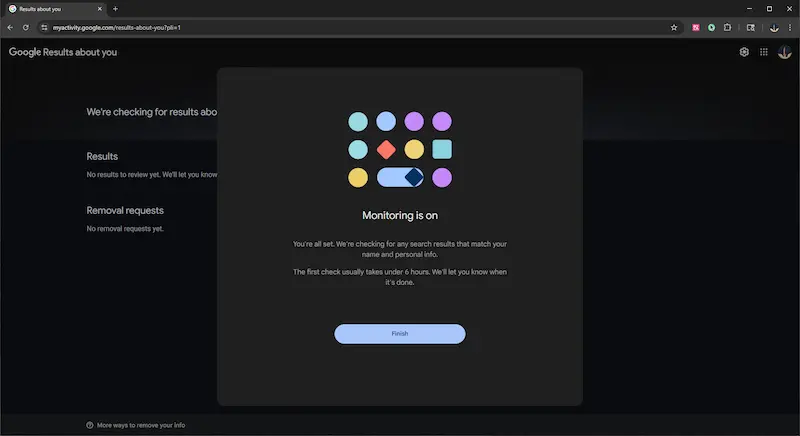
Visit myactivity.google.com/results-about-you or go to your Google Account settings → Security & Privacy → Results About You.
Tips:
- See Google’s official guide: About “Results about you”.
2. Add Your Personal Information for Tracking
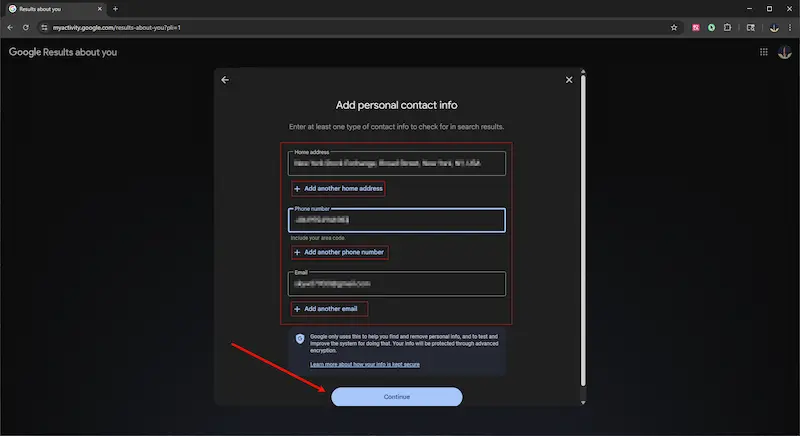
Enter any personal details you want to monitor. Currently, you can include: Name, Address, Phone number, Email address.
To reduce exposure from email leaks and spam, consider auto-deleting spam emails.
3. Let Google Automatically Scan and Notify You
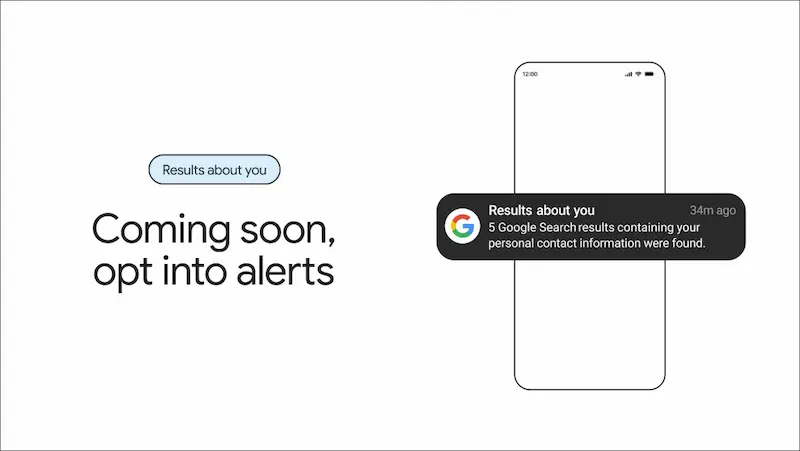
Google will continuously scan its search index for any new results that match your details. You’ll get alerts via email or app notifications when something new is found.
4. Review and Request Removal
In your dashboard, you’ll see a list of search results containing your personal information. Simply click Request Removal for any result you don’t want publicly visible.
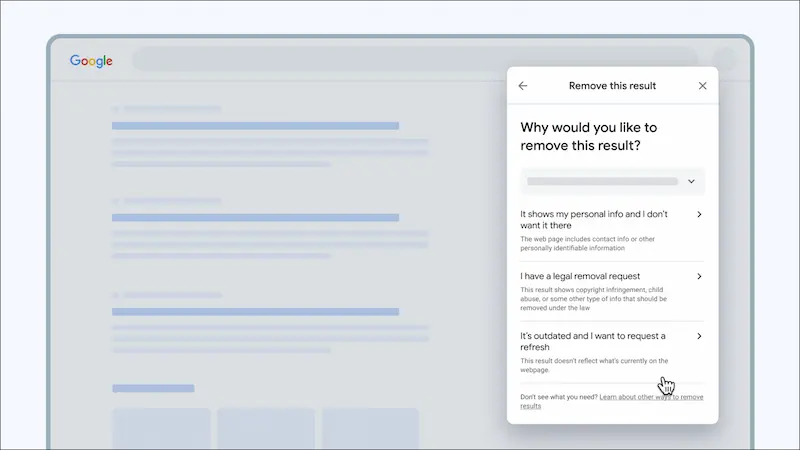
5. Google Reviews Your Request
Google’s team will check if the link violates their Removal Policies. They may reject requests if the information is part of legitimate news coverage, public government records, or content with a strong public interest.
6. Receive Results Feedback
You’ll be notified whether your request is Approved, In Progress, or Denied. Approved entries will disappear from Google Search (though the content may still exist on the original site).
Pro Tips for Maintaining Online Privacy
While Results About You is a valuable tool, it should be part of a broader privacy strategy:
- Check and update your monitored info regularly to ensure all relevant details are included.
- Manually review your dashboard even if you haven’t received new alerts—sometimes things slip through.
- Manage privacy settings on social and professional platforms; also review your browser privacy: protect saved passwords in Chrome, clear browsing history, and remove risky extensions.
- Use Incognito/Private Mode when browsing unfamiliar sites.
- Avoid posting sensitive information on untrusted websites or forums — see how to tell if a website is legit or a scam.
Bonus: SafeSearch Now Blurs Explicit Images by Default
Alongside the global rollout of Results About You, Google has also enabled an AI-powered SafeSearch blur feature by default. This blurs explicit or violent images in search results while keeping text intact. You can turn it off in your account settings anytime. Learn more: Filter explicit results with SafeSearch.
Frequently Asked Questions (FAQ)
1. What is Google’s “Results About You” tool?
Google’s Results About You is a privacy feature that notifies you when your personal information appears in Google Search results. It allows you to request removal of links that contain your sensitive details.
2. How do I access the tool?
Visit myactivity.google.com/results-about-you or go to your Google Account → Security & Privacy → Results About You.
3. What types of personal information can I monitor?
Currently, you can track your name, home address, phone number, and email address.
4. Will Google remove all links containing my personal data?
Not necessarily. Google will review requests based on their removal policies. Certain content, such as public records or news articles, may not be removed.
5. Does removing a search result delete the content from the internet?
No. Removal from Google Search only prevents the link from appearing in results—it does not delete the original content from the website.
6. Can I get notified automatically when new results are found?
Yes. Turn on automatic alerts so Google emails or notifies you when new matches are detected.
Conclusion
Google’s Results About You is a big step toward giving users control over their digital footprint. With its proactive scanning and instant alerts, you can respond faster to potential privacy threats and request the removal of sensitive data directly from search results. If you value your personal safety and online privacy, set it up today and start monitoring your information.
Related Articles
-
![turn off smartscreen filter in microsoft edge]() How to
Turn off SmartScreen Filter in Microsoft Edge and Internet Explorer
How to
Turn off SmartScreen Filter in Microsoft Edge and Internet Explorer
-
![turn on or off smartscreen filter in Windows 10]() How to Turn on
or off SmartScreen Filter in Windows 10 Settings
How to Turn on
or off SmartScreen Filter in Windows 10 Settings
-
![change Windows smartscreen settings]() How to
Change Windows SmartScreen Settings in Windows 10
How to
Change Windows SmartScreen Settings in Windows 10
-
![enable content advisor IE]() How to Enable
Content Advisor in Internet Explorer 10/11
How to Enable
Content Advisor in Internet Explorer 10/11
-
![enable content blocker for safari in iPhone]() How to Enable
Content Blocker for Safari in iPhone
How to Enable
Content Blocker for Safari in iPhone
-
![Enable Microsoft print to pdf option]() How to
Enable Microsoft Print to PDF Option in Windows 10
How to
Enable Microsoft Print to PDF Option in Windows 10