Powerful Windows 7 Password Reset Tool
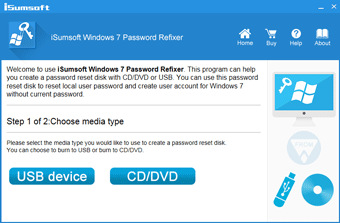
iSumsoft Windows 7 Password Refixer is a powerful Windows 7 password reset tool that allows you to easily reset Windows 7 user/administrator password without losing any data. If you can’t log in to your computer because you forgot your Windows 7 password, this tool is the best solution. It has the following noteworthy features:
- Reset local/domain admin/user password on Windows 7.
- Create new administrator accounts for Windows 7.
- Support all Windows 7 editions, including Windows 7 Ultimate, Windows 7 Professional, Windows 7 Home, Windows 7 Enterprise, and Windows 7 Starter.
- Support both 32-bit and 64-bit versions Windows 7.
- Compatible with any brand of desktop and laptop computers.

2 ways to create a Windows 7 password reset disk
- 1) Burn to USB device.
- 2) Burn to CD/DVD flash drive.
Enjoy more features
- In addition to resetting Windows 7 password, iSumsoft Windows 7 Password Refixer shows a full list of all user accounts existing on your computer and allows you to add one or more new administrator accounts to your computer without requiring you to log on.

Technical Specifications
Windows OS
- Windows 7 Ultimate, Windows 7 Professional, Windows 7 Home, Windows 7 Enterprise, and Windows 7 Starter (32-bit or 64-bit)
Hardware Requirements
- CPU: 1 GHz or above
- RAM: Upwards of 1 GB
- Hard Disk Space: 188 MB Minimum
Frequently Asked Questions
Q1: Can it only be installed on Windows 7?
A: No. It can be installed and run on any Windows OS such as Windows 11/10/8.1/8/7/Vista/XP/2000 and Windows Server 2025/2022/2019/2016/2012/2008/2003, etc.Q2: What should I prepare for using this tool to reset Windows 7 password?
A: Prepare one working Windows computer for downloading and installing this tool, and prepare one USB or CD flash drive for burning this tool.Q3: What's the difference between the trial version and full version?
A: The differences are as follows:1) The trial version only allows you to view all user accounts existing on the Windows 7 and know which users are set with passwords, but it does not support resetting any user password. To reset Windows 7 user password, you need to use the full version of this tool.
2) The trial version allows you to create test users, but the newly created user will expire immediately. The full version allows you to create new users with administrative privileges, which will never expire and you can use to log in to Windows 7.
Q4: Can it reset the Administrator account password?
A: Yes. It can reset all user accounts passwords in your Windows 7.Quick Password Reset
Reset your Windows 7 password at once.
100% Effective
Ensure that it is 100% effective in resetting any Windows 7 password.
100% Secure
Non-shell window and ensure no any data loss or damage.
Easy to Use
Just follow the on-screen instruction. All you need are several clicks, without any computer techniques required.
Instantly reset your Windows 7 password
Step 1: Install and run Windows 7 Password Refixer on any accessible computer.
Step 2: Follow its on-screen instruction to create a password reset disk.
Step 3: Boot password-forgotten computer from the reset disk.
Step 4: Reset Windows 7 account password. Watch Video






Listen to the user's statement
Thank you very much! This worked for me. I had to burn it to a USB flash drive and boot my laptop from there and everything goes smoothly. Thanks again!
Really saved my life. Thank you so much for this software. It was really helpful and saved me from spending money to pay someone else to fix this problem. I will always keep this software in case I forget my Windows 7 password again.