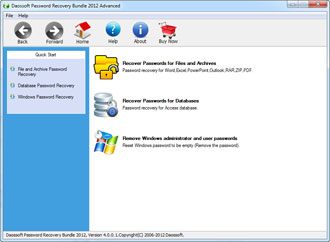

All-in-one Password Recovery Toolkit for PC
iSumsoft Password Refixer Bundle is a powerful and all-in-one password recovery toolkit for PC that recovers lost Windows passwords and passwords for various files.
- Recover user/administrator passwords for Windows 11/10/8.1/8/7/Vista/XP/2000 and Windows Server 2025/2022/2019/2016/2012/2008/2003.
- Recover Microsoft Word/Excel/PowerPoint/Outlook passwords.
- Recover Microsoft Access database passwords.
- Recover RAR/ZIP/PDF passwords.

All-In-One
- iSumsoft Password Refixer Bundel integrates nine password recovery tools for recovering lost passwords for various commonly used files on your PC. Whether you have forgotten the Windows login password or the document opening password, it can provide you with help.
Make password recovery easy
- iSumsoft Password Refixer Bundel is one of the easiest-to-use tools that allows you to quickly recover lost passwords with just a few mouse clicks or a few simple settings, without the need to call in a computer technician.

Technical Specifications
Supported File Formats
- Word: .doc, .docx
- Excel: .xls, .xlxs
- PowerPoint: .ppt, .pptx
- Outlook: .pst, .ost
- Access: .mdb, .accdb
- RAR
- ZIP
Windows OS
- Windows 11/10/8.1/8/7/2000
- Windows Vista/XP
- Windows Server 2025/2022/2019/2016/2012/2008/2003
Supported MS Office Versions
- Microsoft Office: Microsoft 365/2024/2021/2019/2016/2013/2010/2007/2003/XP/2000
Hardware Requirements
- CPU: 1 GHz or above (Intel or AMD)
- RAM: 1 GB or higher
- Hard Disk Space: 193 MB Minimum
Frequently Asked Questions
Q1: Does it support Microsoft 365?
A: No, it doesn't.Q2: Can I use it to remove passwords directly?
A: No, you can't. However, you can use it to retrieve your password before removing it.Q3: How can I create my password dictionary?
A: You can input your commonly used passwords or parts of your passwords in a .txt file using various languages including English, French, Japanese, Chinese etc. Remember one word per line, as shown below.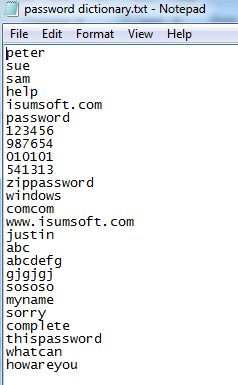
Q4: What type of attack should I choose to speed up the recovery rate?
A:Brute-Force Attack: Best if you know nothing about the lost/forgotten password.
Mask Attack: Better if you can remember your password partially. It will reduce password recovery time.
Dictionary Attack: Best if you use the commonly used words or phrases for password or if you have your own password dictionary. This may be the fastest type.
Smart Attack: If the three types of attack above didn't work, you can try this one.
You can click here to read more about the type of attack and the tutorial of this tool.
Q5: Which edition of this tool should I choose, the Personal, Professional, or Ultimate?
A: It depends on the operation system your computer is running. If it is Windows 7, Vista, XP, 2000, you can choose the Personal edition. If it is Windows 8/10, you need the Professional edition. And if it is Windows Server or if you want to reset Windows Domain password, the Ultimate edition is your best choice.Easy to Use
It is clean and intuitive. Both computer newbie and expert can use it without any problem.
100% Recovery Rate
100% password recovery rate is guaranteed, if you use it properly.
100% Secure
Won't cause any data loss on the computer.
Faster Recovery
It recovers password very fast on the computer with higher CPU power.

Just three steps
Step 1: Install and launch the software on the computer.
Step 2: Choose what types of password you want to recover.
Step 3: Follow the on-screen steps and click the relevant button to recover password.
Watch Video





Listen to the user's statement
Thank you so much. It helped me get back my Excel password, took me almost one hour but it worked. I will always keep this refixer bundle in case I forget other passwords.
OMG! I forgot my user account password on my Windows 10 login screen, and had no idea how to remove it. Thank you so much for your help and software, even Microsoft couldn't help but you can. Thank you once again!