How to Enable Content Blocker Extensions for Safari in iPhone

Content blockers are extensions that let Safari block cookies, images, resources, pop-ups, and other contents. Content blockers affect what content is loaded while using Safari. If you want to make pages load as fast as possible, turn content blocker on is a good choice.
To Activate Content Blocker for Safari on iPhone/iPad
Before you enable content blocker for Safari on iPhone/iPad, you need to download a content blocker first app.
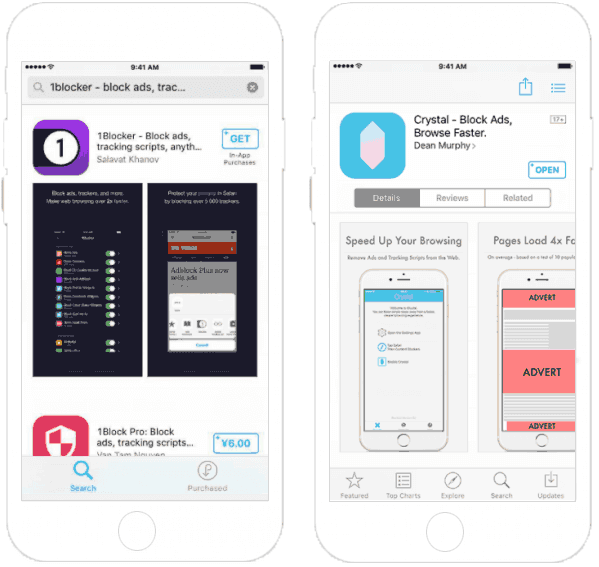
Step 1: Download a Content Blocking App
Go to the App Store to download a content blocking app. The best content blocker app available for iOS devices, like 1Blocker, Crystal and Purify.
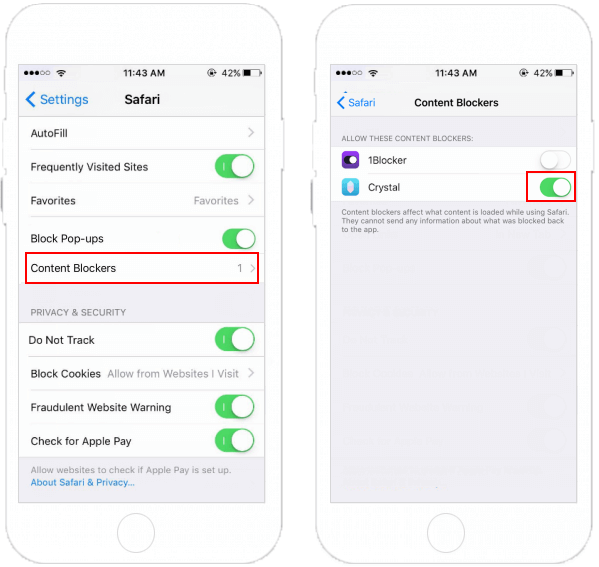
Step 2: Activate Content Blockers in Safari Settings
Go to Settings > Safari. Scroll down to Content Blockers option, then set up the extensions that you want.
Tips: If Content Blocker was greyed out, you might accidentally enable Restrictions for Safari. So you need temporarily disabling restrictions to activate the content blocker.
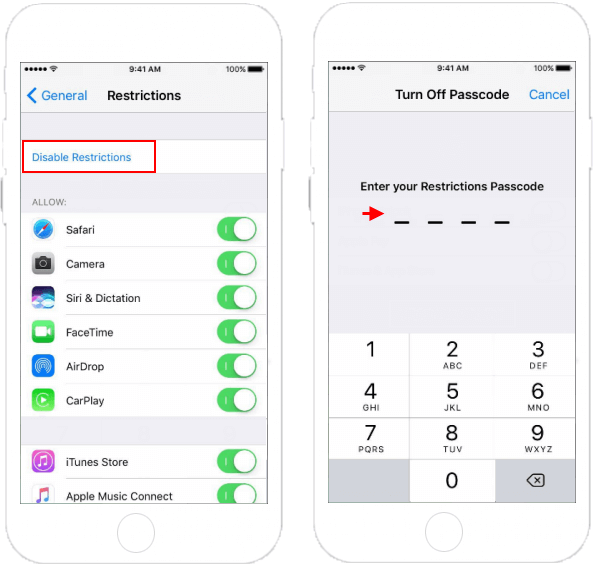
You should be able to turn on your content blocker. Once you've done so, you can re-enable your Restrictions.
Related Articles
-
![Enable Content Advisor IE]() How to Enable
Content Advisor in Internet Explorer 10/11
How to Enable
Content Advisor in Internet Explorer 10/11
-
![Popup blocker]() How to
Enable/Disable Popup Blocker for Safari
How to
Enable/Disable Popup Blocker for Safari
-
![Microsoft edge extensions]() Enable
or Disable Microsoft Edge Extensions in Windows 10
Enable
or Disable Microsoft Edge Extensions in Windows 10
-
![Private browsing mode]() How to Enable
Private Browsing Mode in Safari
How to Enable
Private Browsing Mode in Safari
-
![Enable Microsoft print to pdf option]() How to
Enable Microsoft Print to PDF Option in Windows 10
How to
Enable Microsoft Print to PDF Option in Windows 10
-
![Remove IE Password]() How to
Remove Content Advisor Password in Internet Explorer
How to
Remove Content Advisor Password in Internet Explorer