Best WiFi Password Finder Tool for Windows PC/Laptop
iSumsoft WiFi Password Refixer is a simple and practical WiFi password finder (recovery) tool, which is used to find/recover WiFi passwords saved on Windows PC/laptop.
- Enable you to view/find saved Wi-Fi passwords on Windows computer in an easier way.
- Recover forgotten/lost WiFi passwords from PC/laptop computer.
- Retrieve WiFi password instantly, regardless of the password length and complexity.
- Work for all PCs/laptops based on Windows operating system.
- Support WiFi passwords encrypted with WEP, WPA, WPA2, WPA-PSK, WPA2-PSK, WPA3 techniques.
Find all your saved WiFi passwords
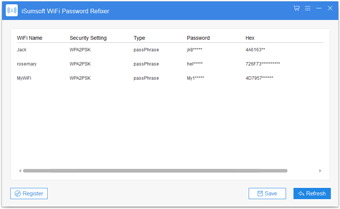
- When you run WiFi Password Refixer on your computer, you will immediately receive all the saved passwords for the Wi-Fi networks to which your computer connected in the past.
Retrieve forgotten WiFi password
- If you ever connected a WiFi network to your computer but now forgot the password (security key), WiFi Password Refixer will help you retrieve the WiFi password instantly.

Technical Specifications
Windows OS
- Windows 11/10/8.1/8/7/2000
- Windows Vista/XP
- Windows Server 2025/2022/2019/2016/2012/2008/2003
Hardware Requirements
- CPU: 1 GHz or above
- RAM: Upwards of 1 GB
- Hard Disk Space: 8.9 MB Minimum
Frequently Asked Questions
Q1: Can it crack an unknown Wi-Fi password?
A: No, it can't. WiFi Password Refixer does not help crack an unknown Wi-Fi network password. It is only used to find/recover passwords for the Wi-Fi networks to which your computer connected currently and in the past.Q2: Does it work on Mac or Android?
A: No, it is a software program based on Windows OS, which only works for Windows machine.Easy to use
With simple and intuitive interface, this program is very easy to use.
100% Recovery Rate
Ensure 100% recovery rate, regardless of the password length and complexity.
100% Secure
Guarantee 100% safety, free of virus and no data loss.
Automatic Discovery
As soon as you run this program, it will automatically discover all saved Wi-Fi passwords on your computer.
How It Works
1. Install and run WiFi Password Refixer on your PC.
2. Immediately you will see all Wi-Fi passwords saved on your PC.
Watch Video





Listen to the user's statement
Thank you, it was very helpful. I finally found the wifi password saved on my Windows 10 laptop so that I could use it on my phone.
Totally worked. I got back my forgotten wifi password in one minute. Thanks. I appreciated this being so helpful and concise.