Backup, Restore, and Transfer iPhone Data
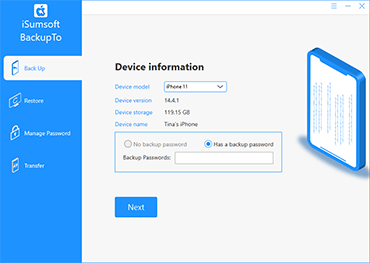
iSumsoft BackupTo is a versatile iPhone backup software tool for Windows, which helps you back up, restore, and transfer iPhone data more easily. It has confirmed support through iOS 26; iOS 27 and iPhone 18 Pro compatibility testing is in progress. The software allows you to:
- Back up the entire iPhone or only specific files.
- Encrypt iPhone backup with password.
- Custom iPhone backup save location.
- Restore iPhone from a backup.
- Transfer data directly from an iPhone to another.

Backup and Restore iPhone
- iSumsoft BackupTo enables you to back up your entire iPhone to your computer with just one click and then restore your iPhone from the backup when needed. You can also back up only the specific files you need, such as photos, contacts, etc.
Manage iPhone backup password
- iSumsoft BackupTo enables you to set a password to encrypt your iPhone backup, and change or delete the password.


Transfer data from iPhone to iPhone
- iSumsoft BackupTo allows you to transfer data directly between two iOS devices without backup and restore. Even if your iPhone's touch screen is broken, you can transfer the data to your new iPhone without effort.
Technical Specifications
Supported Devices
- iPhone: iPhone 18 Pro/Pro Max (validation in progress), iPhone 17/Air/16/15/14/SE/13/12/11/XR/XS/X/8/7/6/5/4 series
- iPad: All models of iPad, iPad Mini, iPad Air, iPad Pro
- iPod: iPod Touch 15/14/13/12/11/10/9/8/7/6/5/4/3/2
System Requirements
- OS:
- Windows 11/10/8.1/8/7/Vista/XP (32-bit or 64-bit) & All Windows Server Versions
- CPU:
- Intel 1 GHz or above
- AMD 1 GHz or above
- RAM: Upwards of 1 GB
- Hard Disk Space: 10.5 MB Minimum
Supported iOS Versions
- iOS Version: iOS 27 (validation in progress), iOS 26/18/17/16/15/14/13/12/11/10/9, and earlier
- iPadOS Version: iPadOS 27 (validation in progress), iPadOS 26/18/17/16/15/14/13, and earlier
Frequently Asked Questions
Q1: Can iSumsoft Backup To back up a locked iPhone?
A: Yes, it can. You don't have to unlock your iPhone to back up.Q2: Can I backup my entire iPhone to my computer?
A: Yes, you can backup your entire iPhone, including your device settings, app data, messages, photos, videos, and other personal data, to your computer using iSumsoft Backup To.Q3: How do I backup my iPhone to my PC without iTunes?
A: iSumsoft Backup To enables you to back up your iPhone without iTunes or Finder. Furthermore, it streamlines your experience and allows you to set a password for your backup.Easy to use
Even computer novices can use it without any problems.
100% Secure
You won't take any risk because it's 100% secure and reliable.
100% Working
It's an iPhone backup software that works 100%.
Quick Backup
You can back up your iPhone data completely in the shortest time.
Back up iPhone in just 3 steps
1. Connect your iPhone to your computer.
2. Select the Back Up option.
3. Select the files to back up and where to save the backup.
4. Click Start to start the backup.
Watch Video





Listen to the user's statement
I ran out of storage on my iCloud and I got the iPhone 12 Pro. Thanks to your iSumsoft BackupTo software, I don't have to start from scratch on my new iPhone.
Extremely helpful software to back up iPhone to computer without iTunes. Thank you!