How to Set a Timer with Siri on iPhone/iPad

There are several ways to set a timer for countdown on iPhone/iPad:
- Option 1: Start from Clock app.
- Option 2: Start a Timer from Control Center. Learn more see this article.
- Option 3: You can choose to set a timer with Siri.
Turn on "Hey Siri", then Set a Timer with Siri.
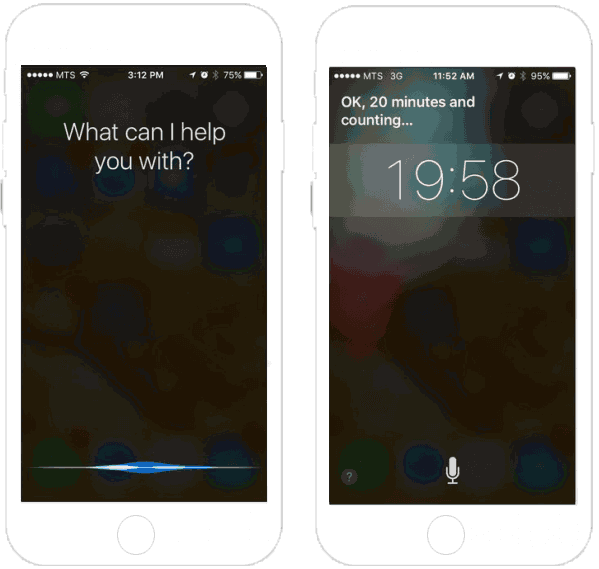
Apple's personal virtual assistant, Siri can help you set a timer. You just say how long you want to time something for, and it shall set a time for you exactly.
Before doing that, you need an Internet connection through Wi-Fi or cellular data. Then go to Settings > Siri, make sure that Siri is turned on, or turn on Allow "Hey Siri" if you use iPhone 7/7 Plus. Learn more see How to Use Siri iPhone 7 and 7Plus.
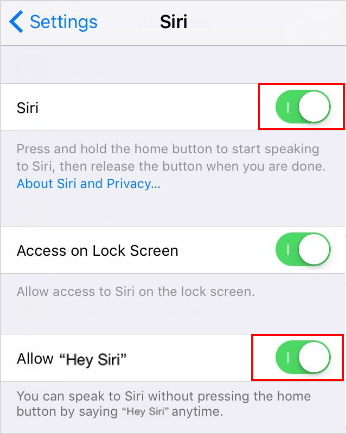
Then follow the steps below to set a timer with Siri:
Step 1: Say " Hey Siri" to activate Siri.
Step 2: Say something like "Set a timer for 20 minutes".
Step 3: Siri should confirm that the timer was created and started.