Best Pokémon GO Spoofer for iPhone Without Jailbreak in 2026

If you want to spoof Pokémon GO on an iPhone without jailbreak, the safest practical approach is to use the official game app together with a stable desktop GPS changer instead of modified clients or system-level tweaks.
Pokémon GO players usually look for the same thing: a working iPhone spoofer that does not require jailbreak, does not break after every iOS update, and gives better control over movement, cooldown, and route planning. That is exactly the search intent this article addresses.
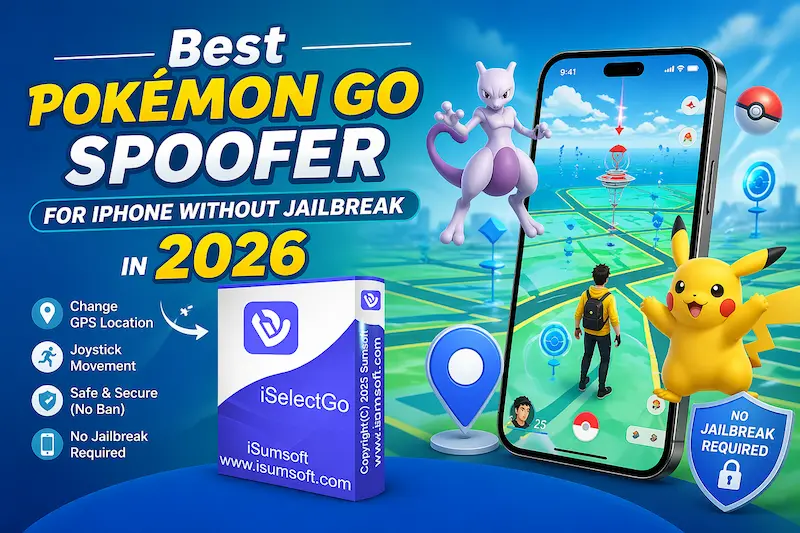
For most users, the best balance of usability and lower-risk workflow is to change the iPhone GPS location from a computer, keep using the official Pokémon GO app, and avoid unrealistic travel behavior. If you need a broader overview first, read how to change location on iPhone.
Quick answer:
- The best Pokémon GO spoofer for iPhone without jailbreak is a PC or Mac based GPS changer that works with the official app.
- iSumsoft iSelectGo is a strong option because it supports instant teleport, route simulation, jump movement, and joystick movement without requiring jailbreak.
- No spoofing method is risk-free, so realistic movement and proper cooldown discipline still matter.
- Why Players Prefer No-Jailbreak Spoofing
- Best Pokémon GO Spoofer for iPhone
- How iPhone Pokémon GO Spoofing Works
- How to Spoof Pokémon GO Location Step by Step
- iSelectGo vs Other Options
- Cooldown and Anti-Ban Best Practices
- Common Questions Players Also Ask
Why Players Prefer No-Jailbreak Spoofing
For iPhone users, no-jailbreak spoofing is the practical choice because it avoids deep system modification. You keep the phone closer to its normal state, reduce compatibility issues after iOS updates, and avoid the extra maintenance that usually comes with jailbreak-based methods.
It also fits how most players actually spoof in 2026. They do not need a complicated setup. They need a clean way to teleport to a raid, simulate a walking route, or move gradually through a hotspot while keeping their main device stable.
Main benefits of a no-jailbreak workflow include:
- Less system risk than jailbreak-based solutions.
- Better compatibility with new iOS versions and newer iPhone models.
- Use of the official Pokémon GO app instead of modified clients.
- Easy route simulation and movement control from a computer.
For privacy-focused use cases beyond gaming, you can also check How to Hide Location on iPhone without Them Knowing.
Best Pokémon GO Spoofer for iPhone: iSumsoft iSelectGo
iSumsoft iSelectGo is the best fit for this page because it matches what users searching this keyword usually want: easy setup, no jailbreak, flexible location modes, and a smoother workflow with Pokémon GO on iPhone.

iSumsoft iSelectGo
Change GPS Location on iPhone/iPad
- Change iPhone GPS location to any city, address, or coordinate in one click
- Simulate movement with single-spot, multi-spot, jump, and joystick modes
- Works with the official Pokémon GO app and does not require jailbreak
- Supports current iPhone and iPad models on both Windows and Mac
- Useful for Pokémon GO, Find My tests, social apps, and general location simulation
Why it works well for Pokémon GO:
One-click location change: Jump to a target area fast when you need a new spawn zone, raid city, or regional event location.
Route simulation: You can simulate walking instead of relying only on repeated teleports, which creates a more natural play pattern.
Jump and joystick modes: Useful when you need more precise map movement during farming sessions.
Cross-platform support: It works on both Windows and Mac, so most iPhone users can adopt the same workflow.
No jailbreak required: You do not need to modify the iPhone system to start using it.
How iPhone Pokémon GO Spoofing Works
A desktop GPS changer works by overriding the location your iPhone reports to apps. In practice, Pokémon GO reads the new GPS position, so your in-game map updates to the destination you select.
This is why desktop-based tools are generally preferred over a VPN. A VPN can change your IP region, but Pokémon GO mainly relies on GPS location rather than IP-based location. So if you want to spoof Pokémon GO on iPhone, a GPS changer is the relevant tool, not a standard VPN.
Important:
- Using a location changer does not remove risk. Pokémon GO can still flag impossible travel behavior.
- Safer play depends on using realistic routes, respecting cooldown, and avoiding repeated long-distance jumps.
How to Spoof Pokémon GO Location with iSelectGo
Here is the simplest way to use iSelectGo as a Pokémon GO spoofer on iPhone without jailbreak.
Step 1: Connect your iPhone to your computer
Use a USB cable or WiFi if available, unlock the iPhone, and tap Trust when prompted. Stable device recognition matters because the location change is applied through the desktop app.
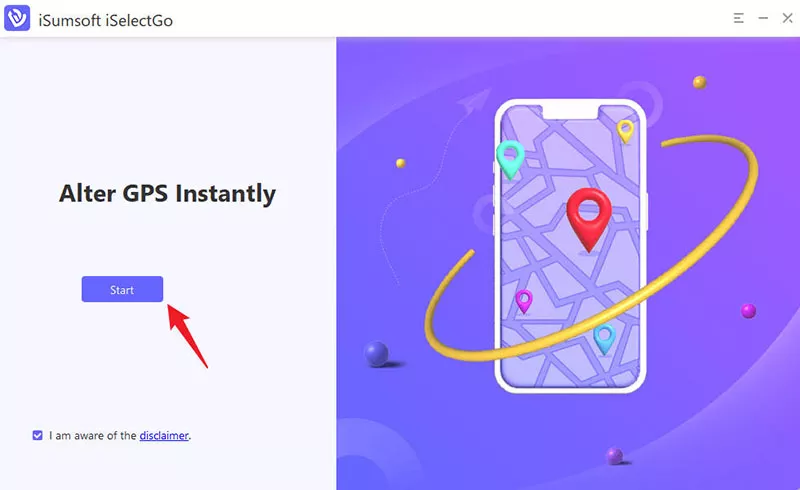
Step 2: Launch iSumsoft iSelectGo
Open iSelectGo on your computer and click Start.
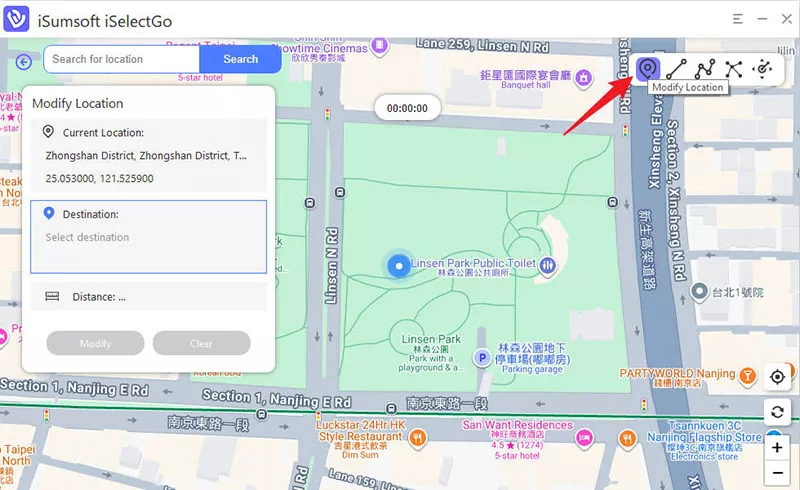
Step 3: Choose Modify Location and set your target area
After the device is detected, click Next to enter the map. Then choose Modify Location, search for the destination you want, and place the pin accurately.
Step 4: Apply the location change
Confirm the target position and apply the new location to the iPhone.
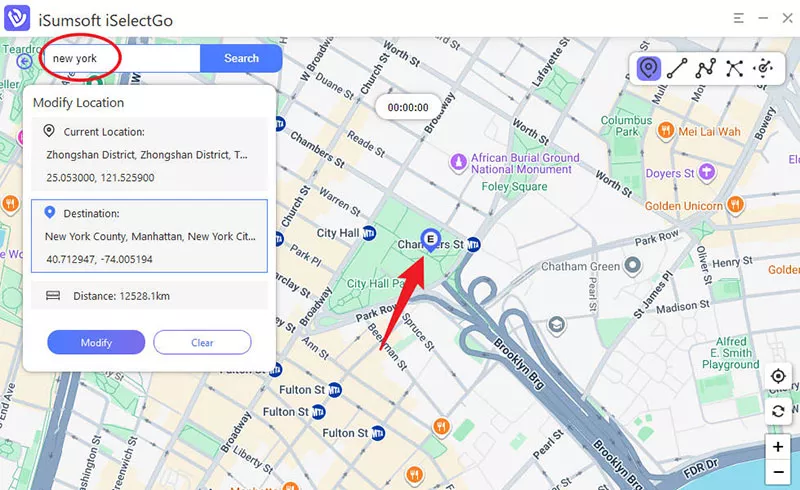
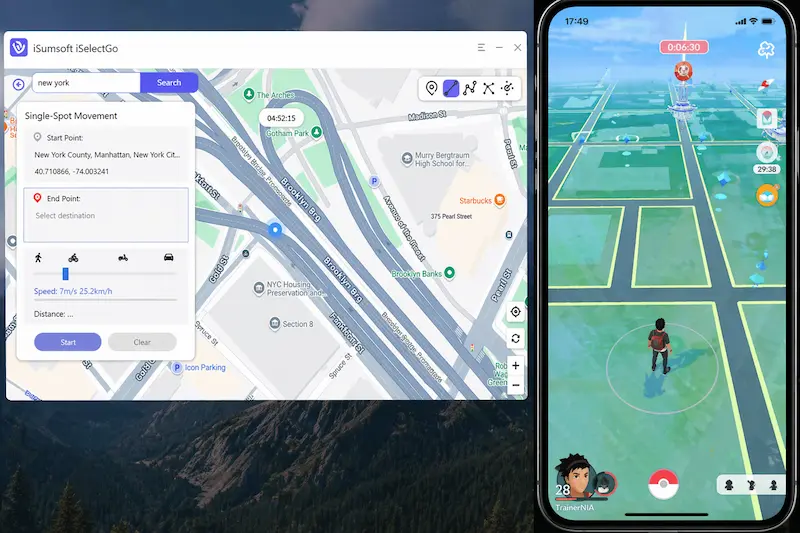
Step 5: Open Pokémon GO and verify your in-game position
Launch Pokémon GO and check whether the in-game map matches the selected location. If you plan to farm in one area, switch to a movement mode and keep walking speed realistic instead of bouncing around the map.
Full official operation guide: How to Use iSumsoft iSelectGo.
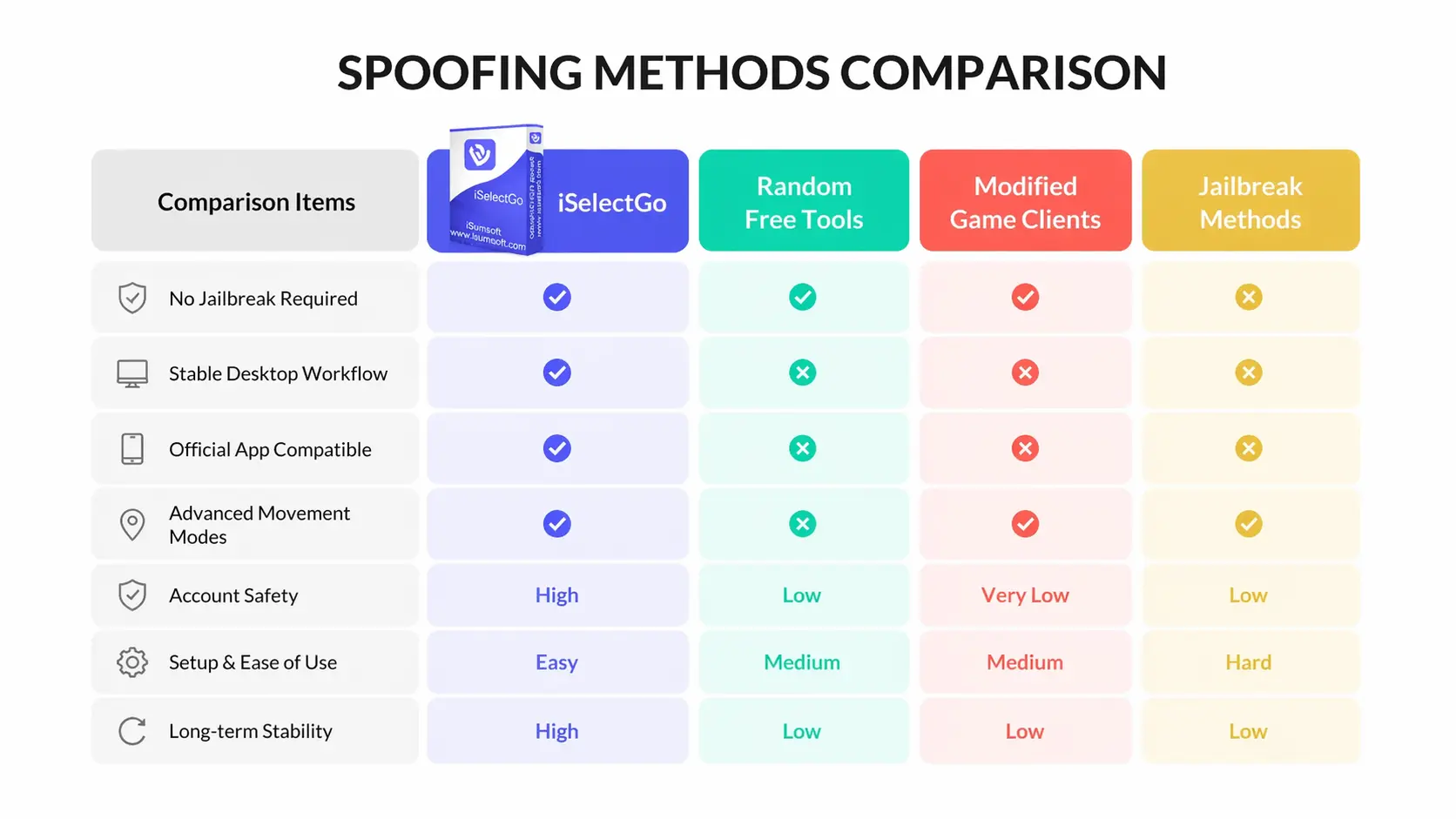
iSelectGo vs Other Options
Not every spoofing method offers the same tradeoff between convenience, stability, and account risk.
Cooldown and Anti-Ban Best Practices
No spoofing approach is 100% risk-free. The goal is not "ban-proof" play. The goal is to reduce obvious risk signals as much as possible.
Follow cooldown windows: After a long-distance jump, wait before catching Pokemon, spinning Pokestops, joining raids, or doing other location-sensitive actions.
Avoid impossible travel patterns: Do not jump between cities or countries in short intervals and then act immediately in each location.
Use realistic movement speeds: Walking or jogging speeds are more natural than fast, continuous map movement.
Prefer route play over constant teleports: A simulated route usually looks more natural than repeated instant jumps.
Use the official Pokémon GO app: Avoid modified clients that introduce extra risk signals.
Policy reminder: Niantic identifies falsifying GPS location as a cheating behavior in its fairness policy. Review the current rule text here: Gameplay Fairness Policy.
Common Questions Players Also Ask
Can you spoof Pokémon GO on iPhone without jailbreak?
Yes. The common no-jailbreak method is to use a computer-based GPS changer that updates the iPhone location while you keep using the official Pokémon GO app.
What is the safest way to spoof Pokémon GO on iPhone?
There is no completely safe spoofing method, but a lower-risk approach is to use the official app, avoid modified clients, follow cooldown rules, and move in realistic patterns.
Does a VPN work for Pokémon GO spoofing on iPhone?
No, not by itself. A VPN changes your IP location, but Pokémon GO primarily checks GPS location, so a GPS changer is the useful tool for spoofing.
Is there a free Pokémon GO spoofer for iPhone?
Some free tools exist, but they are often less stable, less feature-complete, and less reliable for long-term use on current iOS versions.
If your goal is broader location privacy control on iPhone, these related guides are useful:
Manage Location Service in iPhone/iPad
How to Freeze Location on Find My iPhone
Conclusion
If you want the best Pokémon GO spoofer for iPhone without jailbreak, the practical answer is not a flashy modified app. It is a stable GPS changer that works with the official game client and lets you play with more realistic movement habits.
For that workflow, iSumsoft iSelectGo is a strong choice. It is easy to set up, supports the movement modes most players need, and fits users who want a cleaner and more repeatable spoofing process on iPhone.
Start with short tests, respect cooldown, and use route-based movement whenever possible. That is the better balance between convenience and lower-risk play.