

- Device
- Symptom
- Checks
- Your plan
Find help for your iPhone
Enable JavaScript for the guided questions, or browse our iOS troubleshooting articles and iPhone tips.
Guidance only — not a device scan or confirmed diagnosis.
Common iPhone guides
All guides



When to stop
Pause troubleshooting in these situations.
- Liquid or a liquid-detection alertUnplug the cable, do not charge, and let the iPhone dry in open air.Apple’s liquid-alert guidance
- Unusual heat, swelling, or smokeStop using and charging it. Let it cool naturally, away from sunlight.Apple’s temperature guidance
- A drop, crack, or recent repairPhysical damage needs a hardware assessment, not another restore attempt.Contact Apple Support
- Irreplaceable data without a backupPause before any Restore or erasing repair mode. Back up first if the iPhone is accessible.
 Optional paid softwareiSumsoft iOS RefixerFor persistent iOS software problems, including boot loops and stuck screens.
iSumsoft iOS Refixer
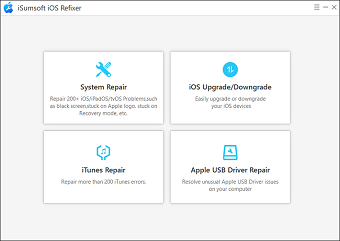
For persistent iOS software problems, including boot loops and stuck screens. Check your plan before choosing a repair.
Back up first. Standard Mode aims to retain data; Advanced Mode erases it. Not for hardware faults or account locks.
Explore iOS RefixerRepair walkthrough · Pricing
Repairs require a paid license.
Questions & sources
Can this tool diagnose or repair my iPhone?
It suggests next steps from your answers; it cannot scan or repair your iPhone. Contact Apple or an authorized provider for a hardware assessment.
Is it free? Why are products shown?
The questionnaire is free. Related iSumsoft tools are optional and shown by symptom. iOS Refixer repair is considered only after the first checks and Apple Update fail, with backup and connection checks completed. Check compatibility, data-loss risks, and pricing first.
Will a repair keep my data?
No repair is risk-free. Back up first when possible. iOS Refixer Standard Mode is designed to retain data, but preservation is not guaranteed. Advanced Mode and Apple’s Restore option erase the device. Stop and seek support if unbacked-up data is irreplaceable.
Where does the guidance come from?
Symptom-specific reading comes from our iOS troubleshooting library and iPhone tips. Older walkthroughs may show different screens; check the current official guidance before a reset. See Apple’s model-identification guide, iPhone 15 repair manual (workflow reference), restart instructions, recovery-mode guide, and liquid-alert guidance, alongside the iOS Refixer product requirements. Guidance reviewed November 18, 2026.