How to Enable Private Browsing Mode in Safari

Use private browsing mode in Safari can protect your private information and blocks some websites from tracking your search behavior. Here is how to enable private browsing on iPhone/iPad/Mac.
Part 1: Enable Private Browsing on iPhone/iPad
Use private browsing mode can prevent Safari from saving your browsing history. Safari doesn't record the pages you visit, your search history, or AutoFill information.
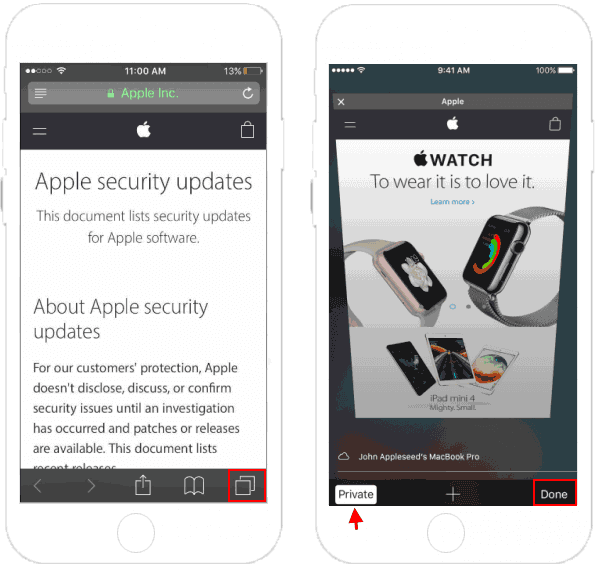
Step 1: On your iPhone/iPad, open Safari.
Step 2: Tap on  . Tap Private, then
tap Done.
. Tap Private, then
tap Done.
Part 2: Enable Private Browsing Mode on Mac
Step 1: On Mac, open Safari.
Step 2: Click on File, and select New Private Window.
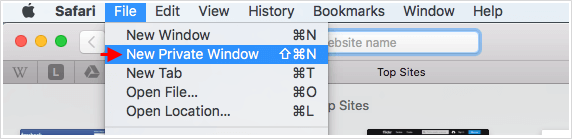
Or use shortcut key: Command + Shift + N.
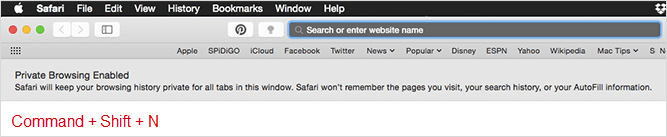
Tips: To turn off Private Browsing mode, you have to go up to the Safari menu and de-select Private option.
Related Articles
-
![block and enable/disable cookies]() Block
and Enable or Disable Cookies from Your iOS 7 Safari
Block
and Enable or Disable Cookies from Your iOS 7 Safari
-
![Enable Edge Inprivate Browsing]() Enable
Microsoft Edge InPrivate Browsing in Windows 10
Enable
Microsoft Edge InPrivate Browsing in Windows 10
-
![Enable AutoFill for Password]() Enable
AutoFill for Password and Credit Card in Safari
Enable
AutoFill for Password and Credit Card in Safari
-
![Private browsing mode]() Enable Private
Browsing Mode in Google Chrome
Enable Private
Browsing Mode in Google Chrome
-
![Clear browsing history]() Delete Browsing
History and Data on Browsers
Delete Browsing
History and Data on Browsers
-
![Clear browsing history]() Clear
Browsing and Search History in Internet Explorer
Clear
Browsing and Search History in Internet Explorer