Windows 11 Could Get Deeper Phone Link Integration and a New Messages App

Microsoft is reportedly exploring deeper Phone Link integration for Windows 11, including a phone flyout in the taskbar, richer Start menu activities, full clipboard history sync, and a standalone Messages app. These features are still prototypes and may change or never ship.
- What Does Phone Link Already Do?
- More Phone Activities in the Start Menu
- A Smartphone Flyout in the Windows 11 Taskbar
- Full Clipboard History Sync Between Phone and PC
- A Standalone Messages App for Windows 11
- Why Microsoft Is Moving Phone Features Into Windows 11
- When Will These Features Be Available?
- Frequently Asked Questions
- Conclusion
Microsoft is reportedly exploring several ways to make smartphones a more natural part of Windows 11. Rather than keeping every cross-device feature inside the Phone Link app, the company may bring phone information and controls directly into the Start menu, taskbar, Windows clipboard, and a separate messaging application.
The overall goal appears to be reducing how often users need to open Phone Link just to read a message, check battery status, view a recent photo, or transfer a file. According to a recent Windows Central report, however, these ideas are still being explored and prototyped internally.
Important: Microsoft has not officially confirmed these features for a public Windows 11 release. The final designs may be different, and some prototypes may never ship.
What Does Phone Link Already Do?
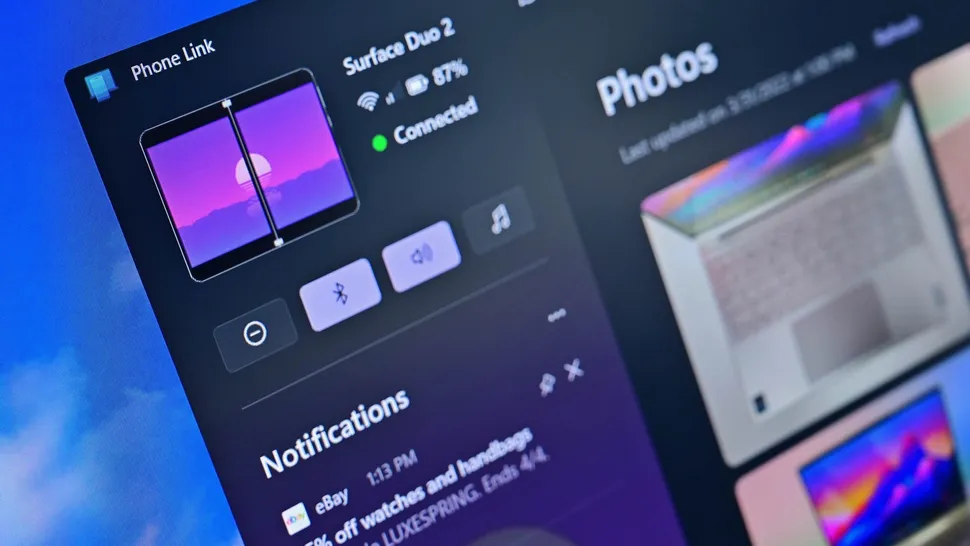
Microsoft Phone Link connects a supported Android phone or iPhone to a Windows PC. Depending on the device, users can access text messages, recent photos, calls, notifications, mobile apps, and other phone features without repeatedly picking up the phone.
Windows 11 also includes a mobile-device panel in the Start menu. It can show battery and connection information while providing shortcuts to supported phone features. Microsoft documents the current experience in its Phone Link Start menu guide.
The newly reported concepts would extend this integration across more areas of Windows 11.
1. More Phone Activities in the Start Menu
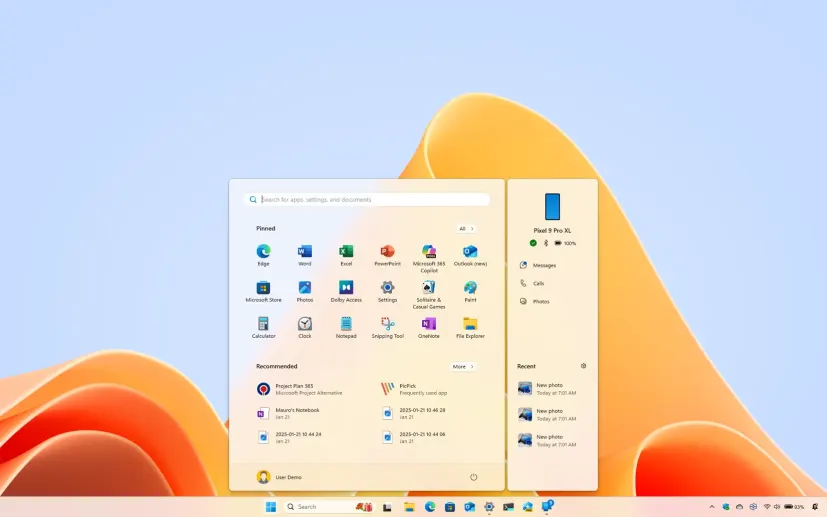
The Phone Companion area in the Start menu may gain a longer and more useful recent-activity feed. Users could scroll through more entries without opening the full Phone Link app.
Microsoft is also reportedly testing hover previews. Moving the pointer over a recent activity could reveal additional information, such as the complete text of a message or a larger preview of a synchronized photo.
This would turn the Start menu panel into a compact phone activity center rather than a simple collection of shortcuts. For users who only need to check a message or inspect a recent photo, the change could remove several unnecessary clicks.
2. A Smartphone Flyout in the Windows 11 Taskbar
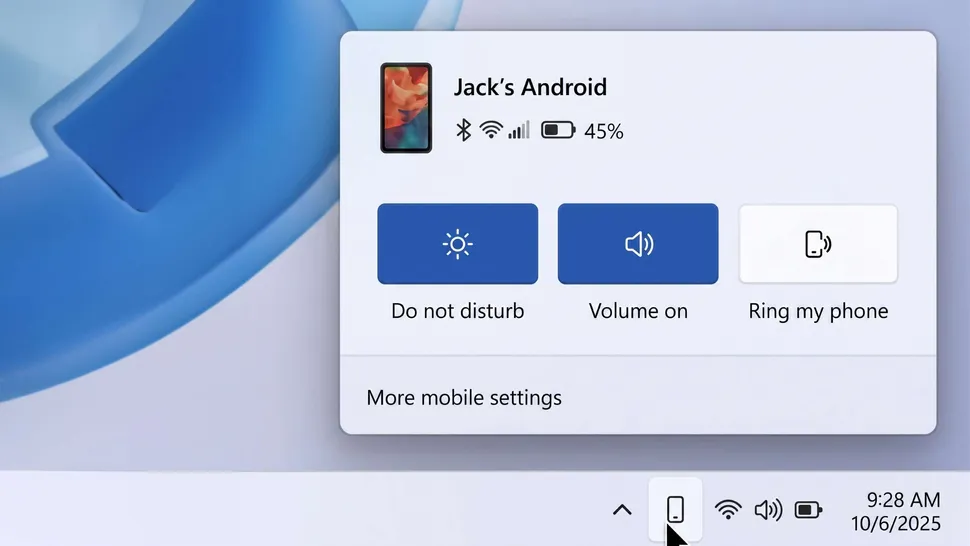
Another reported prototype is a dedicated smartphone flyout in the system tray. When a phone is connected, Windows 11 could display a phone icon beside the other tray icons. Clicking it would open a small control panel for the connected device.
The flyout may include:
- Phone name and connection status
- Remaining battery level
- Do Not Disturb controls
- Ring or vibration status
- Phone volume
- A Find My Phone option
- A shortcut to additional mobile-device settings
The original report also suggests that Microsoft is considering drag-and-drop file sharing. Users may eventually be able to drag a file onto the phone icon to send it directly to the connected device.
3. Full Clipboard History Sync Between Phone and PC
Phone Link already supports cross-device copy and paste on certain devices, but the current experience generally focuses on the most recently copied item. Microsoft is reportedly exploring a more complete clipboard-history system.
Instead of synchronizing only one item, Windows 11 could show a shared list of content recently copied on the PC and phone. This might include text, links, and other supported clipboard content.
For example, a user could copy several links on a phone and later press Windows + V on the PC to select the required item. Text copied earlier on the computer might also remain available from the phone. Microsoft currently explains cross-device copy and paste in its Phone Link setup documentation.
Microsoft has not said which Android phones or iPhones would support an expanded clipboard history.
4. A Standalone Messages App for Windows 11
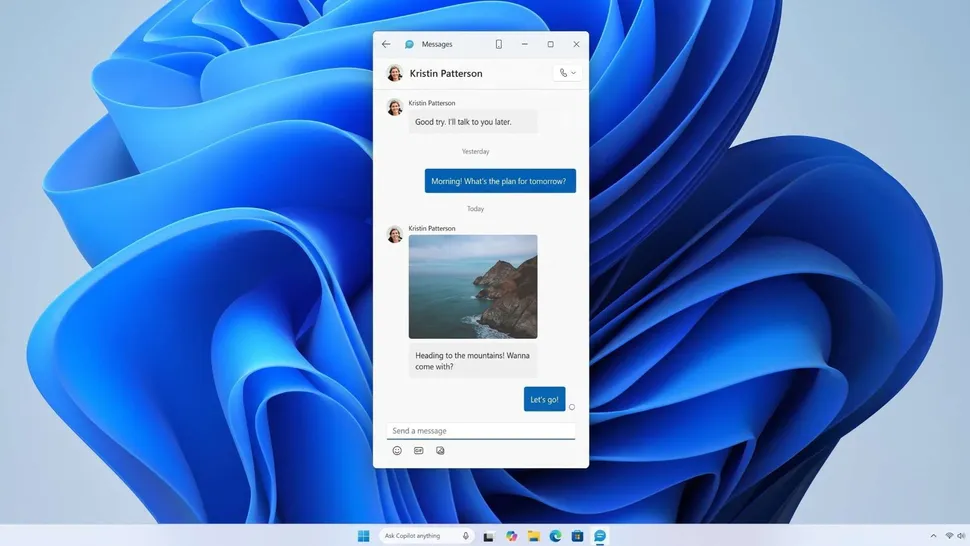
Microsoft is also reportedly prototyping a dedicated Messages app for Windows 11. The app would synchronize SMS conversations from a connected phone and allow users to:
- Read existing conversations
- Reply to text messages
- Start new conversations
- Select recipients from synchronized contacts
- Pin the app to the Start menu
Phone Link already includes a Messages section, so the standalone app would not introduce a completely new capability. Instead, it would separate messaging from the larger Phone Link interface.
That could be convenient for people who frequently send texts from a PC but rarely use Phone Link for calls, photos, Android apps, or screen mirroring. However, it could also feel redundant unless the new app is faster and easier to access than the existing Phone Link experience.
Why Is Microsoft Moving Phone Features Into Windows 11?
Phone Link has traditionally worked as a separate application installed on top of Windows. Microsoft now appears to be placing cross-device features directly in the parts of Windows that users already open throughout the day.
The Start menu can already display phone activity, while supported mobile devices can appear in File Explorer and work with Windows file-sharing features. Microsoft has also tested broader mobile integration through the Windows Insider Program, including improvements to the Start menu phone panel. The company described some of those changes in a Windows Insider blog post.
The reported prototypes continue that strategy. Instead of treating the phone as a device controlled through one app, Microsoft may want phone functions to appear naturally throughout Windows 11.
Will These Features Replace Phone Link?
There is currently no evidence that Microsoft plans to discontinue Phone Link. Even if messaging, clipboard controls, file sharing, and device status appear elsewhere in Windows 11, Phone Link could remain the main place for configuring connected phones and managing permissions.
The app could also continue to provide advanced features that do not fit naturally into a small taskbar flyout, such as calls, app streaming, notification management, screen mirroring, and access to recent photos.
The likely direction is not an immediate replacement for Phone Link. Instead, Microsoft appears to be reducing how often users must open it.
When Will the New Phone Link Features Be Available?
Microsoft has not announced a release date for any of the reported features.
They are said to be internal prototypes, which means Microsoft may change, delay, or cancel them. If development continues, the features could first appear in a Windows Insider build so that Microsoft can collect feedback before deciding whether to release them more widely.
Even an appearance in the Insider Program would not guarantee a public launch. Compatibility may also differ between Android phones and iPhones because the two platforms currently support different Phone Link capabilities.
Frequently Asked Questions
Is the new Windows 11 phone flyout available now?
No. The system-tray phone flyout described in the report is reportedly an internal prototype. Microsoft has not announced it as a public Windows 11 feature.
Can Windows 11 already show my phone in the Start menu?
Yes. On supported systems, Windows 11 can show a connected mobile-device panel with battery information, connection status, recent activities, and shortcuts. The setting is generally available under Settings > Personalization > Start > Show mobile device in Start.
Does Phone Link work with both Android and iPhone?
Yes, but feature availability differs by platform, phone model, and Windows version. Android devices generally support a broader collection of Phone Link capabilities.
Is Microsoft releasing a new SMS app?
Microsoft is reportedly prototyping a standalone Messages app that would synchronize SMS conversations through a connected phone. It has not been officially announced as a finished product.
Will clipboard history work with every phone?
That is not yet known. Existing cross-device copy and paste is limited to supported devices, and Microsoft has not published compatibility requirements for the reported clipboard-history upgrade.
Conclusion
The reported changes suggest that Microsoft wants connected phones to become a more visible and useful part of Windows 11. A taskbar flyout could make essential controls easier to reach, while richer Start menu activities could reduce the need to open Phone Link. Full clipboard-history synchronization could improve productivity, and a dedicated Messages app could make texting from a PC more convenient.
The most important change is the overall direction: Microsoft appears to be moving smartphone features out of a single app and placing them throughout the Windows interface.
For now, users should treat these features as possible future improvements rather than confirmed Windows 11 additions.
Sources: Windows Central, Microsoft Support, and Windows Insider Blog.
Related Articles
-
![Windows 11 Start Menu not working after update]() 8 Ways to Fix
Windows 11 Start Menu Not Working after Update
8 Ways to Fix
Windows 11 Start Menu Not Working after Update
-
![taskbar missing from Windows 10]() 6 Ways to Fix
Taskbar Missing from Windows 10
6 Ways to Fix
Taskbar Missing from Windows 10
-
![downgrate from Windows to Windows 10]() How to
Downgrade from Windows 11 to Windows 10 without Losing Data
How to
Downgrade from Windows 11 to Windows 10 without Losing Data
-
![There are currently no power options]() Fix "There are
currently no power options" in Windows 11
Fix "There are
currently no power options" in Windows 11
-
![battery missing from taskbar Windows 10]() 7 Ways to Fix
Battery Icon Missing from Taskbar in Windows 10
7 Ways to Fix
Battery Icon Missing from Taskbar in Windows 10
-
![Power button missing from Windows login screen]() How to Fix
Power Button Missing from Windows 10 Login Screen
How to Fix
Power Button Missing from Windows 10 Login Screen