
Recover/Reveal Email Account Passwords in MS Outlook
iSumsoft Outlook Email Password Refixer is a simple utility that recovers/reveals email account passwords saved in Microsoft Outlook Outlook for Microsoft 365, 2021, 2019, 2016, 2013, 2010, 2007, 2003, 2002, 2000.
- Support all kinds of email accounts added into Microsoft Outlook app, such as Gmail, Hotmail, Outlook mail, Yahoo mail and so forth.
- Support POP3, IMAP, SMTP and HTTP accounts in Microsoft Outlook app.
- Recover passwords instantly, regardless of the password length and complexity.
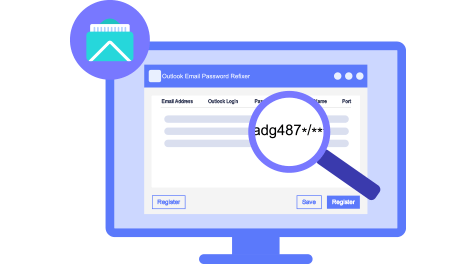
Retrieve email account passwords easily
- Adding email accounts to Outlook app and letting Outlook remember the passwords greatly facilitate us, which means we don't have to type passwords each time we check for emails. But with time, this may result in forgetting the passwords. Once you forget your email account password, you have to reset the password, which is usually a troublesome process. However, there is no need to worry now. Outlook Email Password Refixer enables you to retrieve your email account passwords from Microsoft Outlook app with no effort.
Immediate Recovery
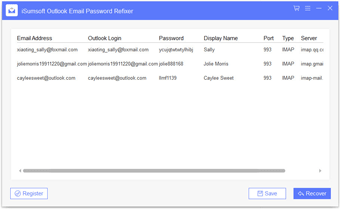
- Just need one click of the Start button and all email account passwords in Microsoft Outlook can be revealed immediately on the screen.

Technical Specifications
Supported Accounts & Protocols
- Accounts: Gmail, Hotmail, Outlook mail, Yahoo mail, etc.
- Protocols: POP3, IMAP, SMTP and HTTP Protocal
Windows OS
- Windows 11/10/8.1/8/7/2000
- Windows Vista/XP
- Windows Server 2025/2022/2019/2016/2012/2008/2003
Hardware Requirements
- CPU: 1 GHz or above
- RAM: Upwards of 1 GB
- Hard Disk Space: 2.78MB Minimum
Frequently Asked Questions
Q1: Do I need to run Outlook app to use the utility?
A: No, you don't have to. As long as you have Microsoft Outlook app installed on your computer, even if you don't run Outlook app, iSumsoft Outlook Email Password Refixer can automatically detect all the email accounts added to your Outlook app and recover their passwords. Of course, if Outlook app runs when using this utility, it doesn't matter.Q2: What if the software does not reveal my email account password?
After running this program, if you don't see your email account password on the screen, please click on the Recover button. If you still can't see your password after clicking the Recover button, chances are the email account has not been added to your Outlook app on your computer. If that's the case, you have to go to the web browser to retrieve your email account password.Easy to use
With simple and intuitive interface, this program is very easy to use.
100% Recovery Rate
Ensure 100% recovery rate, regardless of the password length and complexity.
100% Secure
Guarantee 100% safety, free of virus and no data loss.
Automatic Discovery
As soon as you run this program, it will automatically discover all email accounts in your Outlook app.
How It Works
Step 1: Install and launch Outlook Email Password Refixer.
Step 2: Click the Start button.
Step 3: Immediately you can see all email account passwords display on the screen.
Watch Video





Listen to the user's statement
Forgot my Gmail account password, and failed to retrieve password from Gmail sign-in page because I couldn't provide enough information. Finally, I found this Refixer tool and used it to retrieve my Gmail password from the Outlook app. Thanks very much.
Thanks for designing this program. I was screwed without my mail account password and couldn't view the password in Outlook app. You saved me. Much appreciated!