How to Use Product Key Finder
As we know, a product key usually consists of 25 letters or numerals. It is extremely hard to manually remember a product key, so we usually save it in a text file on the computer or keep it on any online storage space. However, no matter where you save a product key, the loss still may happen. If you unfortunately lost or misplaced the product keys for the Windows OS or software currently installed on your computer, take it easy. The iSumsoft Product Key Finder tool can help you to find all your product keys at once. Now follow this guide. We will show you how to use iSumsoft Product Key Finder.
What do you need?
Software: iSumsoft Product Key Finder.
OS Support: Windows NT4/2000/XP/2003/Vista/2008/2012/2016, Windows 7/8/10.
Hardware Requirements: 20 MB or more; 256 MB or above.
Step 1: Install and launch this tool on the computer

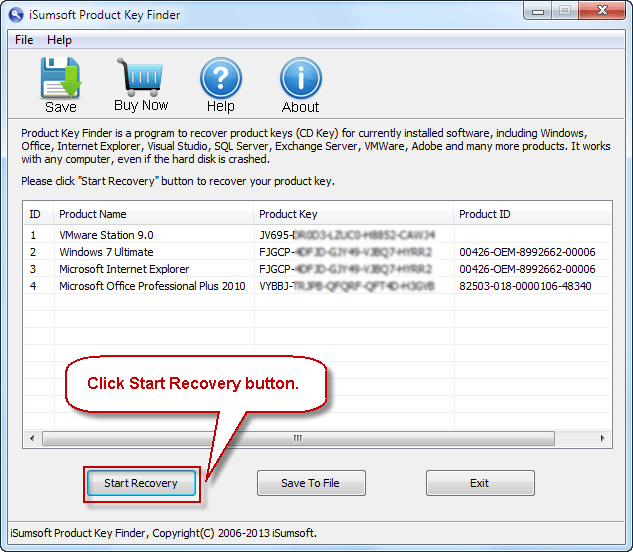
Step 2: Click "Start Recovery" button to find product keys
After you launch this tool on your computer, click on the "Start Recovery" button. Immediately, the product keys for the Windows OS as well as other software currently installed on the computer are found and displayed on the screen, as shown in the figure below.
Step 3: Click "Save to File" button to save all product keys
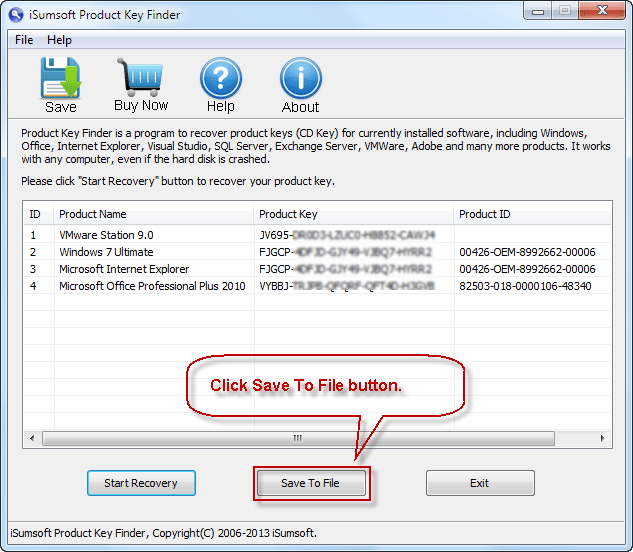
In order that you can easily view and use the product keys, you can click the "Save to File" or "Save" button to save all the product keys in a text file.
Tips: The trial version of this tool only allows you to view the first five letters or digits of each product key. The full version can show you the complete product keys.